How to build a computer
MY SUPER PC
How To Build A PC - A Computer Building Guide
Rob Williams - contact via the forums
Last Updated: 7/1/2009
How to build a computer
Making PCWorld's "Best Free Stuff On The Web Guide - 101 Great Sites" as the favorite Build A PC site!


Build A Computer Like My Super PC

DVD

The industry has overcome many of the obstacles that prevented a DVD drive from being a worthwhile addition to a PC. Compatibility has long been a bane of DVD usage. And while things are still not perfect today and probably never will be, incompatibility should be a relatively rare occurrence if you use the right DVD drive. The cost of even dual format DVD RW drives has reached reasonable levels. And it's easy to see now that there will come a day when many software packages are provided on DVD today rather than multiple CD's as, in fact, some already are.

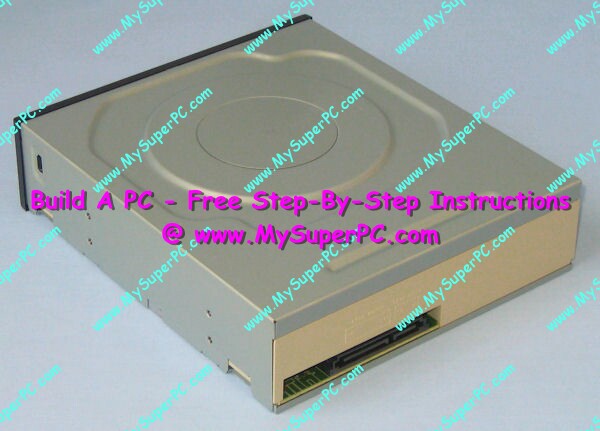
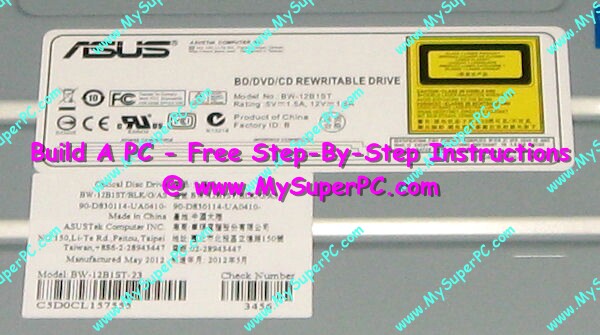
I recommend a dual format DVD RW, meaning one that supports both the dash (-) and plus (+) formats, to ensure maximum compatibility. An OEM DVD RW drive, such as this Samsung SH-S223Q drive, is nice if you don't want or need the software that comes packaged in a retail DVD RW.
front view
rear view
label
How To Assemble A Computer - PC Assembly Guide, Samsung DVD RW How To Assemble A Computer - PC Assembly Guide, Samsung DVD RW How To Assemble A Computer - PC Assembly Guide, Samsung DVD RW
Sony DVD RW drives have an excellent reputation for quality at a reasonable price, and include an excellent set of software to support the type of functions you normally want to do with a DVD RW, such as making backups, video editing and production, and music CD's. This Sony DRU-840A which includes excellent software packages such as MusicMatch and PowerDVD in its retail package.
How To Assemble A Computer - PC Assembly Guide, Sony DVD RW retail box How To Assemble A Computer - PC Assembly Guide, Sony DVD RW retail box contents How To Assemble A Computer - PC Assembly Guide, Sony DVD RW drive

When it comes to optical devices, they can be had in just about any functional combination. For example, and without trying to list every variety, here is a partial list.

  • CDROM
  • CDRW
  • DVD ROM/CDRW
  • DVD RW single format
  • DVD RW dual format

    The speed of a DVD drive is expressed in some number of "x". A speed of "1x" corresponds to 1.385 million bytes per second, or 1.321 MB/s.

    A DVD ROM drive lets you read DVD's on your computer. A DVD RW drive allows you to "burn" your own data onto DVD's using your computer. A DVD RW drive will also support CDRW.

    Should you even get a DVD device for your computer? I'd say the vast majority of computer users don't use DVD, don't even have a DVD device in their computer and don't miss it. Of those who do have it, many use it so little they wouldn't miss it if they didn't have it. But that's today and tomorrow is another story. It's my position that today you should not get an optical device which is just a CDROM drive. Instead, you should get at least a CDRW drive since it does not cost very much more and you may find you want to burn CD's someday. The computer is just that much more useful, fun and desirable with a CDRW drive in it.

    The same can be said of getting a DVD ROM/CDRW drive. These drives are able to read DVD's, such as play store-bought DVD's. Prices have fallen to such a point that it's not a great number of dollars more to go with a DVD ROM/CDRW drive instead of a CDRW drive. In fact, even writable DVD drives are not that expensive anymore. And it helps that you really only need one optical drive since each step up in an optical drive is capable of doing everything up to that level. It used to be a smart move to have a CD-ROM or CD-RW for the day-to-day "heavy lifting" CD usage in addition to the DVD drive, but at today's prices and capabilities it's fine to have the DVD RW drive do it all.

    If you get the DVD ROM/CDRW drive then the computer is just that much more useful, fun and desirable. The nice thing about having a DVD ROM/CDRW drive is that it allows DVD movies to be viewed on the computer. On the other hand, most people would prefer to watch a movie on their monster TV screen from the comfort of their sofa rather than on a computer monitor while sitting at their computer desk.

    A DVD RW drive has even more appeal and much more uses than a DVD ROM drive since you can write data to it. It's great for backups and essential for video editing. The question of which one to get is a little more complicated due to concerns with compatibility with other DVD components.

    The options for writing DVD's is comparable to CD's, except there are two DVD format standards. The two formats of interest today are DVD-RW and DVD+RW. Like CDRW, both of these formats allow the DVD media to be re-written as many times as you like. Like CD's, they have their "write once" counterparts, namely DVD-R and DVD+R. Like CD's, each format has it's own media, meaning, for example, you need a DVD media which is DVD-R to "write once" using a DVD device that supports DVD-R. And like CD's, the "write once" is more commonly used since usually writing once is enough and because "write once" media is cheaper than multiple read/write media.

    With DVD, compatibility between DVD players and DVD drives is an issue with no 100% guaranteed solution. Not all DVD players and DVD ROMs will play all DVD's, regardless of whether the DVD media was recorded following the "DVD dash" format or the "DVD plus" format. In fact, not all DVD players and DVD-ROMs will play all store-bought movie DVD's, especially older models. The lack of perfect compatibility anywhere in the DVD world is a bit exasperating. On the other hand, I still run across VHS tapes that play well on one of my new-ish VCR's but not very well at all on my other new-ish VCR. But DVD compatibility is of little concern if you go with quality and flexibility. Quality in the sense of quality DVD equipment and media, and flexibility in getting a DVD read/write device that supports both formats.

    If you know you'd like a DVD RW drive then which one do you get? DVD components are in relative infancy in their evolution when compared to other computer components, even other optical components such as CD. It's not hard to predict that DVD will follow a similar evolution as CD, namely with ever increasing drive speeds and with gradual reductions in the cost of the drive and media. And like CD drives, there will come a day when the decision is pretty straight-forward and free from buyer's remorse (due to faster, cheaper drives coming out a few months later). But today you'll have to give your purchase careful consideration and then buy knowing full well that today's DVD drives, like most computer components, will be replaced by cheaper and better DVD drives all too soon.

    A single format DVD RW device supports one format standard, either DVD-RW or DVD+RW. A dual format DVD RW device will support both the DVD-RW standard and DVD+RW format standard. This article from Anandtech, What are the differences in DVD recordable formats, is a little out-of-date and by now a little inaccurate, but it is still useful as an overview of the existing DVD formats. There's no clear cut winner between DVD dash and DVD plus. Neither solution is perfectly compatible with all other DVD components. However, either solution should be sufficient for most. There are differentiating factors, but nothing that makes one a clear and unmistakable choice over the other.

    The compatibility factor. Compatibility with other DVD components is not an issue if the DVD RW drive is only used on a single computer to manage data as is done with a hard drive. But compatibility is an issue if, for example, the computer is going to be used to play store-bought DVD's or to make videos to play on a DVD player. It cannot be assumed that a DVD player will be compatible with either the DVD dash or DVD plus formats. A DVD player may work with any combination of DVD-R, DVD-RW, DVD+R and DVD+RW. It may work with all of them. It may work with none of them. Or, for example, it may work with DVD-R, DVD+R and DVD+RW, but not DVD-RW. Or any other combination you care to name. If compatibility is important then buy a quality DVD player and test it against each format. The concensus opinion is that DVD dash offers somewhat better compatibility than DVD plus. However, non-compatibility is generally skewed toward older DVD components. Compatibility is about the same, and still imperfect, with newer DVD components.

    The functional factor. DVD+RW is able to operate as a general purpose read/write device with random access of the media, just as is done by a hard drive. DVD-RW operates by writing the entire DVD (sequential access). This can be a significant performance advantage for the DVD plus format in completing update functions since unchanged data on the DVD plus media is not re-written. This speeds up tasks such as video editing.

    The cost of media factor. For most, the cost of the DVD media itself should not be a factor in deciding what to use. Each format has its own DVD media, DVD-R, DVD-RW, DVD+R and DVD+RW. The cost between DVD-R and DVD+R media is roughly the same. The same can be said for the more expensive DVD-RW and DVD+RW medias. Sale prices, bulk purchases, rebates, rated speed and the brand/quality of the media selected all affect price, so general cost comparisons don't mean very much. It's more important to use the media that's right for the job.

    The storage capacity factor. Both formats store the same amount of data, 4.7GB.

    Many may find a single format DVD RW drive that supports either format sufficient. A single format DVD RW drive will save some money over a dual format DVD RW drive.

    However, I would prefer a top quality dual format DVD RW device, meaning a DVD RW drive that supports both the DVD-RW format and DVD+RW format. This ensures my DVD RW device still meets the commonly used format should one format emerge as a clear choice over the other, and it ensures I can use DVD's created on my DVD RW device in any other DVD component since I can create it in an alternate format if the first format turns out to be incompatible with a particular DVD component.

    What Not To Worry About

    You may have heard of DVD-RAM. This is yet another DVD format standard. There is no reason to pursue DVD-RAM. It is not compatibile with any other DVD format, not even DVD dash, so it requires its own DVD device and its own media. Its purpose is to provide random read-write access DVD functionality, but this is something done by DVD+RW much better and with compatibility. DVD-RAM is not compatible with DVD players or with DVD devices that do not specifcally support DVD-RAM. In short, it's use is pretty much limited to being a DVD hard drive for a single computer.

    You may have heard about DVD's with a capacity greater than 4.7GB. The 4.7GB capacity DVD's are single-sided and single-layered. DVD's also exist as double-sided and also as dual layered (or double layered). Double-sided means the reverse side of the DVD can be used. Dual-layered means the same side of the DVD can be written to hold twice as much as the single-layered DVD. So a double-sided and dual-layered DVD can hold 4 times 4.7GB of data. However, they are cost prohibitive. Plus lableling a double-sided DVD is a bit problematical.

    Dual (double) layering is starting to reach the marketplace. It's becoming commonplace for the DVD RW drive to support some measure of dual (double) layering, such as only for the DVD-R format and at very low speeds. So that's something. You can think of it as a freebie since the addition hasn't hurt the prices of DVD RW drives at all. But it's not that practical to actually use. Dual layered media is vastly more expensive than single layered media.

    Other DVD RW Considerations

    The most important considerations in purchasing a DVD RW drive is to get a quality drive that supports both the DVD dash and DVD plus format. This will ensure the greatest compatibility today and in the future. There are other things to look for as well.

    Any DVD RW device should provide the same functionality as a CD RW device, namely to read CD's (CD-ROM), to write once CD's (CD-R) and to write a CD multiple times (CD-RW). But the speed of these three CD RW functions may vary from one DVD RW device to another. Be sure to check the CD RW speed ratings of the DVD RW device so you know what you're getting.

    The retail package of a DVD RW drive should include software. Some DVD RW drives will provide a better software package than others. A DVD RW drive has very useful purposes.The most common DVD uses include making system backups and video support, such as video capture, video editing and video production. It's a big bonus if the DVD RW drive not only includes software that supports all of these uses, but that the software is top-rated software. And the software should also include support for making audio CD's since, don't forget, the DVD RW drive is also a CD RW drive.

    Best DVD Drive

    Sony has established itself as the leader in quality DVD RW drives. Other brands with excellent reputations include Lite-On, NEC and Samsung.

    If you need to know anything else about DVD technology then an excellent, up-to-date, source of information on all things DVD is DVD Demystified.

    Next: Build A Computer Like My Super PC - Change The Front Panel On The DVD RW


  • Skip Ahead
      Introduction/Cost To Build A Computer
      Computer Building Price Considerations
      faq: OEM Definition
      Case And Power Supply
      Processor
      Motherboard
      BIOS Settings
      RAM
      Video Card
      Sound Card
      Hard Drive
      faq: Can I Use My Old Hard Drive With A New Computer?
      CD-ROM And CD-RW
      DVD
      Change The Front Panel On The DVD RW
      Flat Panel LCD Monitor
      Other Computer Hardware
      Windows Operating System
      Firewall
      Sharing Cable Modem or DSL
      CPU Cooler And Case Fans
      Overclocking
      How Fast Is It?
      Assemble
      What Problems Were There?
      More About How To Get A Cheap Computer With Top Quality And High Performance
      Changes For A Game Computer And Enjoying Computer Games
      Changes For A Computer With MP3 Music As A Priority
      Media Center PC
      Help And Support
      faq: How Can I Tell What I Already Have In My Computer?

    © 2001-2009, Rob Williams, all rights reserved.