My Super PC

Build A PC - How To Assemble

Computer Assembly - How To Assemble A PC

Ready The Keyboard and Mouse

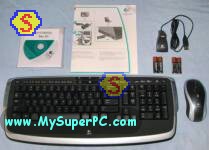
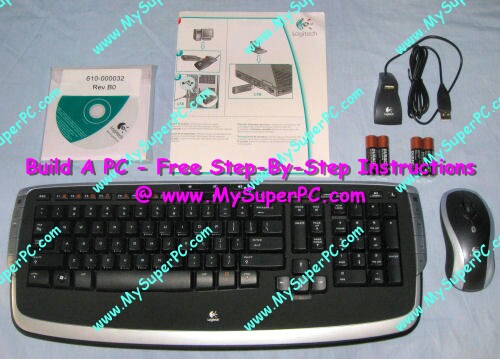
Here's what came in the box containing the Logitech Cordless Keyboard and Mouse.
How To Assemble A Computer - PC Assembly Guide, Logitech Cordless Keyboard and Mouse box
The Duracell Ultra batteries included with the keyboard and mouse are two AA size batteries for the keyboard and two AAA size batteries for the mouse. Flip the keyboard over, open the battery compartment and insert the two AA batteries. Pop the top of the mouse by pushing the latch on the bottom and insert the two AAA size batteries.

The keyboard and mouse will be connected to the back of the computer using the PS/2 type connectors, so remove the adapters from each.
How To Assemble A Computer - PC Assembly Guide, Logitech Cordless Keyboard and Mouse with adapters How To Assemble A Computer - PC Assembly Guide, Logitech Cordless Keyboard and Mouse without adapters


Back to My Super PC - Home Page


How To Build A Computer. Step By Step Instructions To Assemble. Skip To Any Assembly Step.

  Parts List [go]
  Tools [go]
  Antistatic Wrist Strap [go]
  Computer Case and Power Supply [go]
  Motherboard [go]
  Processor, CPU Cooler and Thermal Compound [go]
  RAM - System Memory [go]
  Video Card [go]
  Monitor [go]
  Keyboard and Mouse [go]
  Floppy Drive [go]
  Hard Drive [go]
  CD-ROM, CD-RW, DVD RW [go]
  Sound Card and Speakers [go]
  Modem [go]
  Install the Processor onto the Motherboard [go]
  Install the CPU Cooler [go]
  Install the RAM - System Memory [go]
  Install the Motherboard into the Computer Case [go]
  Install the Video Card [go]
  Connect the Power Supply to the Motherboard [20-pin Connector  or  24-pin Connector]
  Connect the PN1 and PN2 Indicators to the Motherboard [KS-282 to EPoX 8RDA+  or  Sonata to MSI K8N Neo Platinum]
  Ready the Monitor [go]
  Ready the Keyboard and Mouse [go]
  First Boot [go]
  First Boot Common Problems [go]
  Install the CD-ROM, CD-RW, DVD RW Drives [go]
  Install the Hard Drive and Floppy Drive [PATA Hard Drive  or  SATA Hard Drive]
  Connect the Speakers (if using built-in sound) [go]
  Second Boot [PATA  or  SATA]
  Configure the BIOS Parameter Settings [EPoX 8RDA+  or  MSI K8N Neo Platinum]
  Test The Hard Drive [PATA  or  SATA]
  Install a Second SATA Hard Drive For RAID (optional) [go]
  Install the Operating System - Windows XP [on PATA hard drive  or  on SATA hard drive]
  Driver Installation [go]
  How To Copy Big Files From Another Computer Using Just a Floppy Drive [go]
  Install the Modem [go]
  Install the Motherboard Chipset Drivers [EPoX 8RDA+  or  MSI K8N Neo Platinum]
  Install the Monitor Driver [go]
  Install the Video Card Drivers [EPoX 8RDA+  or  MSI K8N Neo Platinum]
  Install the Sound Card and Speakers [go]
  Install System Information Utility - EVEREST [go]
  Diagnostic Test - DirectX [go]
  Speed Test - System Memory (RAM) Performance [go]
  Speed Test - Hard Drive Performance [PATA and SATA results]
  Speed Test - CD Performance [go]
  Speed Test - Total System Performance [go]
  Stress/Torture Tests [go]
  Connect Front Panel Ports For Audio, Firewire and USB 2.0 [go]
  Install Rear Panel Ports For Firewire And USB 2.0 [go]
  Install The Computer Case Fans [go]
  Post Assembly Needs [go]
  Graduation [go]
  Video Card Driver Settings [go]
  BIOS Flash Update [go]
  BIOS Settings [go]


Back to My Super PC - Home Page

© 2001-2010, Rob Williams, all rights reserved.
Building your own computer!  My Super PC - Click here when you're ready for the ultimate upgrade!  How to build an affordable, quality, fast PC!

My Tutorials
Build, Upgrade Help
Computer Memory Upgrade
Hard Drive Upgrade
Video Card Upgrade
My Super PC


Even More Help
MySuperPC Forums


Great prices on computer parts
Crucial
Crucial UK & Europe
Newegg
PCMicroStore
TigerDirect
ZipZoomFly


Great software prices
Amazon


Deals and Rebates
Amazon Specials
Newegg Rebates
TigerDirect Bundles
ZipZoomFly Rebates


Web Hosting
Yahoo! Web Hosting


Utilities
Carbonite Backups
Mozy Backups
Norton AntiVirus, Tools
PC Tools


Laptops
HP Laptop Deals
Sony VAIO Wide Screen


Buy The Book!
These assembly pages in book form!
Info