Computer Assembly - How To Assemble A PC
Tools
Besides the parts list items, you'll need a few tools, most or all of which you probably already have.
- A Phillips screwdriver.
- A flathead screwdriver.
- Needle nose pliers might come in handy if you happen to drop something in a hard to reach place.
- A 5mm socket wrench, which is the size needed for the motherboard mounting posts that came with the Antec Sonata II computer case.
- A flashlight can sometimes come in handy when you're trying to make out something on an item that you've already installed, but I doubt you'll really need it.
- Alcohol 91% pure or Acetone, if you'll be removing the pre-applied thermal compound from the CPU cooler to use the Arctic Silver 5 instead. If so then you'll also need a clean, expired credit card (for scraping), a brand new toothbrush (for scrubbing) and lint free cloths (for wiping and rubbing) to remove the pre-applied thermal compound.
Antistatic Wrist Strap
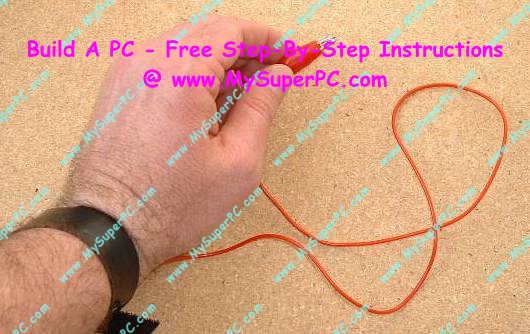
An antistatic wrist strap should be worn any time work is being done inside the computer. The alligator clip should be attached to a non-painted metal surface on the computer case. The antistatic wrist strap prevents static electricity from building up. Static electricity can electronically destroy many of the delicate components inside the computer. As an extra precaution, it's a good idea not to shuffle around while working inside the computer case. If you need to change position then let go of any electronic component, change your position, get comfortable again, then touch the non-painted metal surface of the computer case with your hand before touching anything else. Touching the non-painted metal surface of the computer case with your hand is another way to harmlessly release any static buildup. But this is an extra precautionary step - you should still always wear the antistatic wrist strap while working inside the case for any reason.
Good antistatic wrist straps are not expensive,
such as this Belkin antistatic wrist strap from Amazon.
Ok. Let's take a closer look at each component in their order of appearance. A general note: there are tons of pictures on the following pages. The small picture is displayed on the page by default since this is sufficient most of the time, especially after the first viewing, and it speeds up downloading considerably. Click on any picture to see it enlarged.
Back to My Super PC - Home Page
How To Build A Computer. Step By Step Instructions To Assemble. Skip To Any Assembly Step.
Back to My Super PC - Home Page
© 2001-2015, Rob Williams, all rights reserved.
|

|